 garajiz
● Tyres and balancing
Tyre shop software: handle the seasonal rush with bookings.
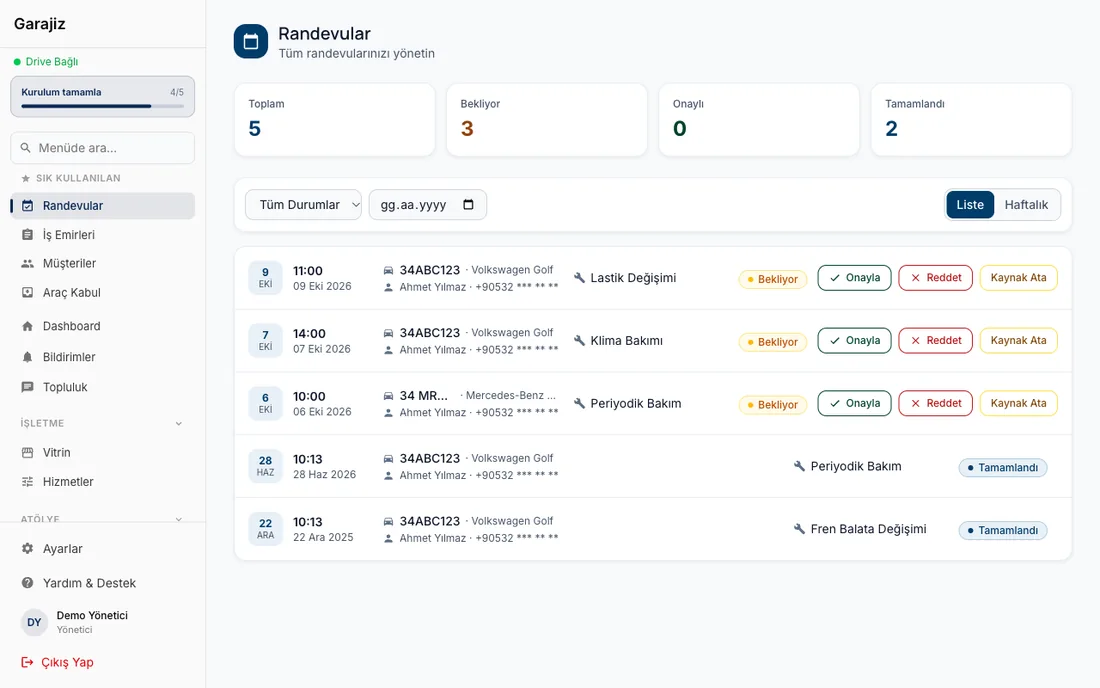
When November and April come, there's a queue outside the shop. In Garajiz you set your daily capacity based on your lifts or tyre machines; the customer picks only free slots. Stock, payments and customer notes are in the same software.
01 Headaches you leave behind
What does it solve?
Booking capacity matches your lifts; full slots close to customers.
Every size is a separate stock item; deducted as it goes on work orders.
Cash, card and bank transfer are recorded separately; POS commission and the net amount are visible.
02 From the workshop
A tyre shop's year is two seasons.
Most of the year is quiet, then with the first cold snap or with spring everyone comes in the same week. Phone bookings are written in a notebook, three cars land on the same hour, the customer waits at the door and next season goes elsewhere. What carries the load of the season is setting up your working hours in advance.
In Garajiz you set opening and closing times for each day, the booking length and how many cars you can take at once. You increase capacity in the season and lower it on the day a technician is off. The customer sees only the slots still free, from your shop page on Google or from the vehicle owner app; you approve the request.
There's no separate module for stored tyres (tyre hotel). You write the size, quantity and shelf location of the tyres a customer leaves in the customer or vehicle notes; when you search the plate the note comes up. As the season approaches, you can filter customers by car make or last visit date on the bulk message screen and let them know over WhatsApp.
03 Step by step
How does it work?
Enter your season capacity
Working hours day by day, booking length and the number of cars at once; holidays and days off are closed.
Bookings come in
The customer picks a free slot and the request reaches you as a notification; if two requests come in for the last spot, only one is accepted.
Change and check
Tyre, balancing and alignment items are written on the work order; in the inspection template you can record the tread depth (mm) of all four tyres and DOT compliance.
Payment and cash
Cash, card or bank transfer goes on the work order; for card payments the POS terminal's commission and the net amount that will reach the bank are calculated.
▶ See it on video
Shop booking system: no more chaos
Online booking requests on one screen; the customer picks a free slot, the shop approves.
04 Features
What's included?
No add-on modules: everything below is in Garajiz's single plan, together with every other feature.
- Online booking with capacity — day by day, as many as your lifts
- Double-booking prevention — only one accepted for the last spot
- Stock and multiple warehouses — every size a separate item
- Barcode scanning — scan the size with the camera to find it
- Tread depth measurement — four wheels separately, mm
- Customer and vehicle notes — note stored tyres
- Bulk WhatsApp list — by make or last visit
- POS terminal records — commission and net amount
Garajiz has no separate “tyre hotel” (tyre storage) module; you track stored tyres with customer and vehicle notes.
● Free template
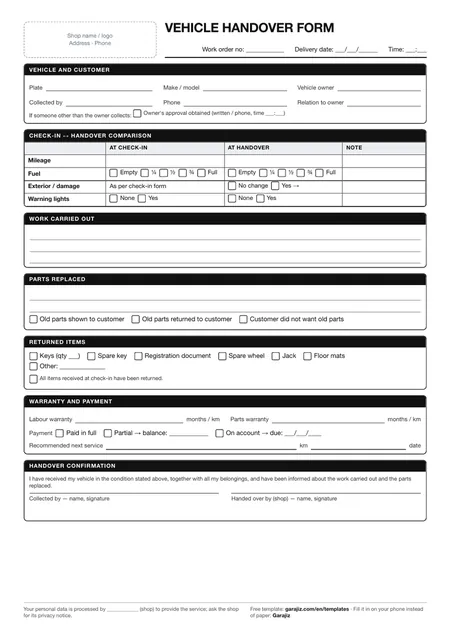
Vehicle handover form (PDF)
A printable form for mileage, fuel, returned items and the customer's signature at delivery. For anyone who wants to work tidily on paper before switching to software.
05 Questions
Frequently asked.
Can I run tyre hotel (tyre storage) tracking?
There's no separate tyre hotel module. You write the size, quantity and shelf location of stored tyres in the customer or vehicle notes; the note comes up when you open the car.
How do I increase booking capacity in the season?
In your working hours you increase the number of cars at once for those days. The new value is reflected in free slots immediately; bookings already approved aren't affected.
Can I open a job for a walk-in customer?
Yes. Booking isn't required; a work order is opened directly for a car that comes in the door.
Can I send my customers seasonal reminders?
On the bulk message screen you filter customers by car make or months since their last visit and prepare a WhatsApp send list. Records without messaging consent aren't selected automatically.
06 Related pages
All in the same software.
● Start today
Try it free for 14 days.
No card. Every feature unlocked. No setup.