 garajiz
● Repair tracking
Repair tracking software: which car is where, on one screen.
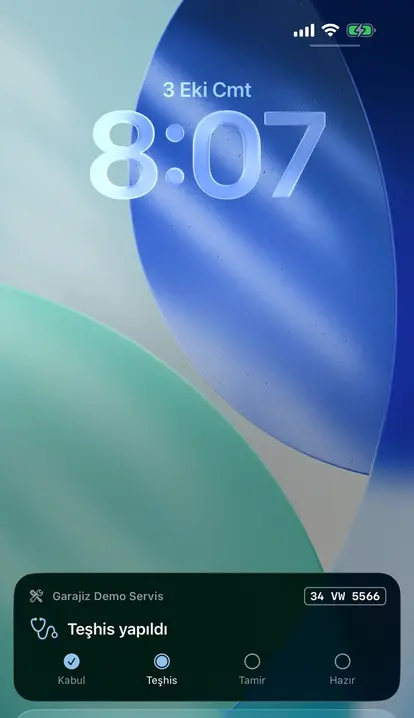
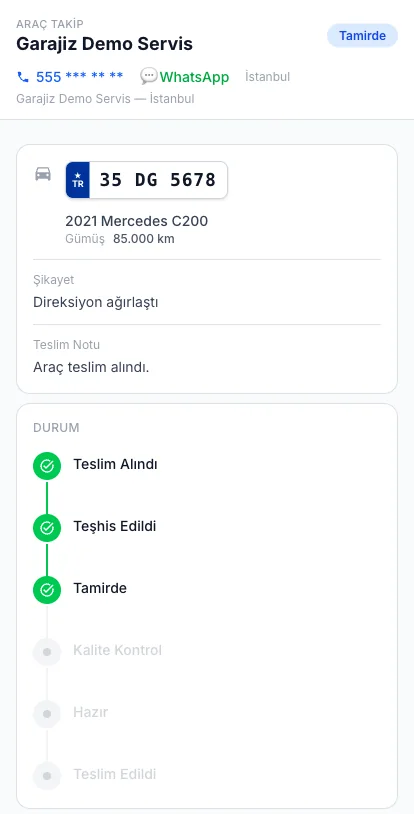
In an auto repair shop a job moves stage by stage: checked in, diagnosis, waiting for parts, in repair, quality check, ready and delivered. You, your technician and your customer all see which stage each car is at. The customer doesn’t call to ask “what’s happening with my car?”; they check the tracking link.
01 Headaches you leave behind
What does it solve?
The customer sees the status from the link or QR sent to them.
Every work order sits in the list with its stage and assigned technician.
The estimated delivery time is visible; it turns red when late.
02 Step by step
How does it work?
The car is checked in
Plate, mileage, fuel, complaint and damage photos go on the work order; a tracking link goes to the customer.
The stage is updated
When the technician moves to diagnosis, repair or quality check, they change the stage with one tap.
The customer is kept informed
Every stage change shows up instantly on the customer's tracking page; customers with the app get a notification. When the car is ready, they're told by email.
The car is delivered
Delivery mileage is recorded and the job goes into the vehicle's history. Delivery with photos and customer sign-off are coming in the next release.
▶ See it on video
Send customers a tracking link and get fewer calls
Garajiz messages include the work order's tracking link automatically; the customer follows the car themselves.
03 Features
What's included?
No add-on modules: everything below is in Garajiz's single plan, together with every other feature.
- Staged work orders — received → diagnosis → waiting for parts → in repair → quality check → ready → delivered
- Live tracking link and QR — the customer opens it without downloading an app
- Estimated delivery time — late jobs are flagged in red
- Technician screen — technicians see the jobs in the workshop and add items; prices, cash and finance stay hidden
- One-tap contact — the customer calls your location from the tracking page
- Payment when ready — the amount and “Pay with QR” appear on the tracking page
- Vehicle passport — a delivered job goes into the vehicle's service history
- Multiple locations — cars from every location in the same list, filterable
● Free template
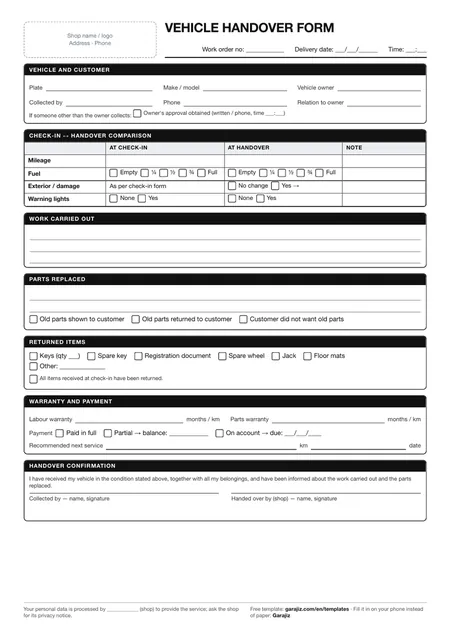
Vehicle handover form (PDF)
A printable form for mileage, fuel, returned items and the customer's signature at delivery. For anyone who wants to work tidily on paper before switching to software.
04 Questions
Frequently asked.
Does my customer have to download an app to track the repair?
No. The tracking page opens from a link or QR; no app or sign-up is needed.
Can the repair tracking software be used across multiple locations?
Yes. Each location's work orders are tracked separately; with the right permission you see them all in one list.
Does the customer see the price on the tracking link?
If you use the quote approval flow, they see the price item by item and approve it. For jobs without the approval flow, the price is shown only when the car is ready.
How long does the tracking link stay open?
Details stay visible for 7 days after the job is delivered; then the link is locked.
05 Related pages
All in the same software.
● Start today
Try it free for 14 days.
No card. Every feature unlocked. No setup.