 garajiz
● Customer and vehicle cards
Auto repair customer management: who came, who didn't, who owes you.
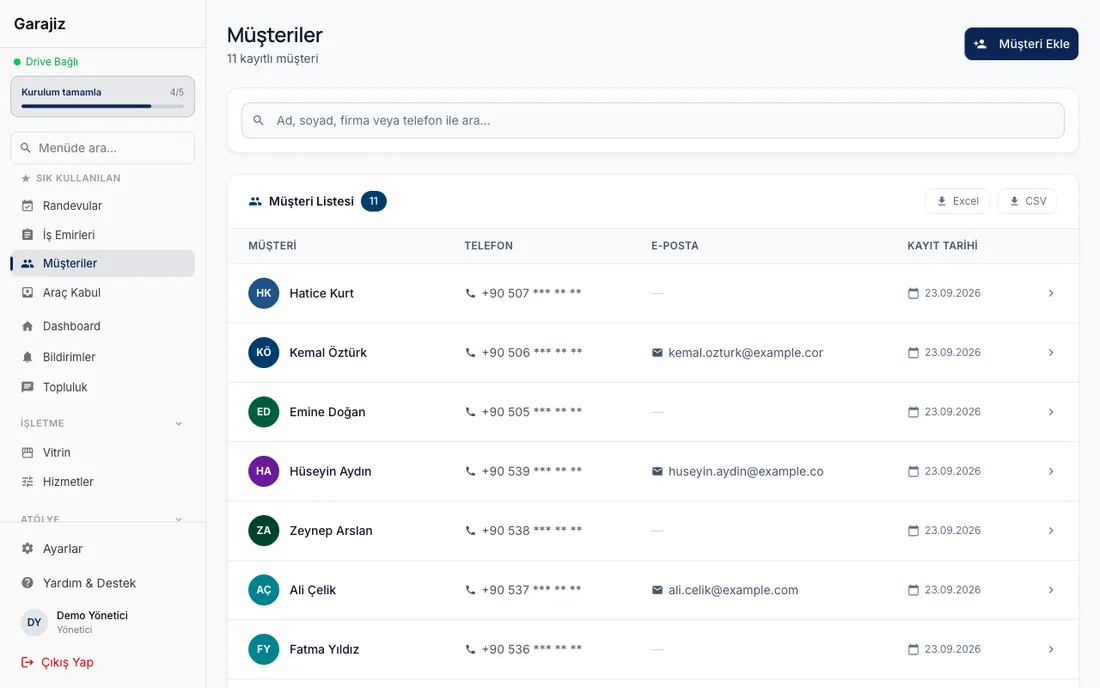
A customer comes once; whether they come back depends on how well you remember them. Garajiz keeps every customer on one card with their vehicles, past jobs and open balance, and lists those who haven't been in for a long time and those whose inspection is coming up.
01 Headaches you leave behind
What does it solve?
The customer card shows their vehicles and all past work orders.
The Debtors filter (in the iPhone app) shows who owes how much with one tap.
Customers whose last visit is getting old are filtered out and messaged over WhatsApp.
02 From the workshop
A loyal customer is a remembered customer.
A neighbourhood shop's strength is that the mechanic knows their customers. But once there are a few hundred customers, nobody can keep in their head who has which car, when they last came in, or whose payment is outstanding. This information gets scattered across notebooks, the phone's contacts and WhatsApp chats.
In Garajiz the customer card brings it together: contact details, vehicles, each vehicle's work orders, payments, open balance and your notes. Type the plate and the car and its owner come up together. If the same customer was saved twice you merge the records, and you take payments right from the card.
On the bulk message screen you filter customers by car make, months since their last visit, or whose inspection or service is due in the next 30 days, and prepare a WhatsApp send list. Records without messaging consent aren't included in “select all”; you send messages in line with Turkish data protection (KVKK) and commercial messaging rules.
03 Step by step
How does it work?
A card is opened on the first visit
The customer and vehicle are saved together with the work order; in the web panel the make and model year come from the VIN.
Every job goes on the card
Jobs done, mileage, payments and open balance build up on the customer's card.
Balances are visible
The Debtors filter in the iPhone app lists those with an open balance and the amount; payments are recorded right on the card.
Call them back
You filter those who haven't been in for a long time or whose inspection is coming up, and prepare a WhatsApp list.
▶ See it on video
Tracking customers who owe you: who owes how much?
The Debtors filter in the customer list of the Garajiz iPhone app: who owes how much, on one screen.
▶ See it on video
5 habits that lose a shop its customers
Giving status only by phone, quoting verbally, not taking photos at delivery and two more habits. Garajiz makes most of them easier.
04 Features
What's included?
No add-on modules: everything below is in Garajiz's single plan, together with every other feature.
- Customer and vehicle cards — several vehicles per customer
- Service history — every work order for each vehicle
- Debtors filter — open balance and amount (in the iPhone app)
- Payments from the card
- Bulk WhatsApp list — make, last visit, inspection and service
- Messaging consent check — customers without consent aren't selected automatically
- Duplicate record merge
- Customer portal — customers see their own jobs and quotes
05 Questions
Frequently asked.
Does Garajiz send the bulk messages?
Garajiz prepares the recipient list and the message text; messages go out over WhatsApp from your own account, each one confirmed individually.
How does Garajiz know the inspection date?
You enter the vehicle's inspection date on the vehicle record; the next date from maintenance plans is included in the same list.
Can I export my customer list?
Yes. Authorised users can export the customer and vehicle list as CSV (opens in Excel).
Does every employee see customers' phone numbers?
Access to personal data depends on the role. For example, only users with that permission can open the bulk message list; the technician role doesn't have it.
06 Related pages
All in the same software.
● Start today
Try it free for 14 days.
No card. Every feature unlocked. No setup.