 garajiz
● Bookkeeping
Auto repair bookkeeping: no receivable is ever forgotten.
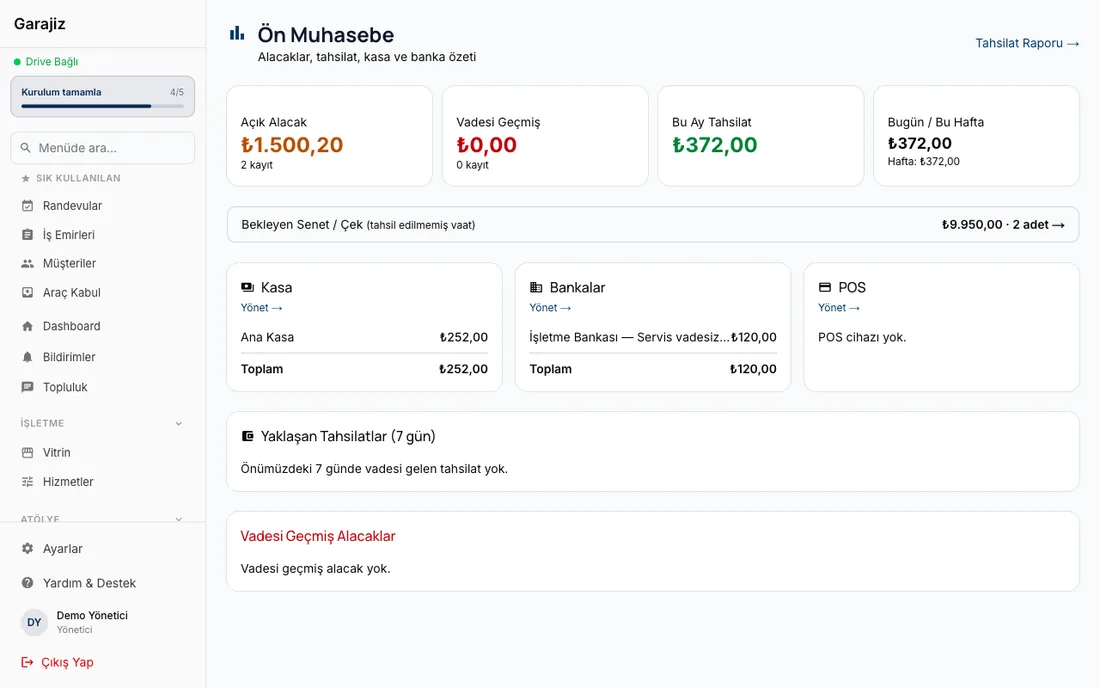
Payments, cash, bank, instalments, promissory notes and expenses are kept linked to work orders. The amount to collect sits at the top of the work order list; at the end of the month you see your profit.
01 Headaches you leave behind
What does it solve?
The amount to collect is at the top of the list; instalments and notes coming due move up front.
Cash, card and bank transfer are recorded separately.
Revenue, expenses and a profit report on one screen.
02 Step by step
How does it work?
Payment at delivery
Cash, card, bank transfer, instalments or on account; the amount is linked to the work order.
Sales on credit and with promissory notes
Instalments and promissory notes are recorded with their due dates; upcoming ones are flagged.
Expense records
Expenses such as rent, salaries and parts purchases are entered by category; recurring ones are created automatically.
Reports
You see revenue, expenses, profit and payment status period by period.
03 Receivables and payables
What you're owed and what you owe, on one screen.
On the finance screen, receivables from the proforma invoices you issue to customers and what you owe suppliers sit in the same place. At the end of the month you see the answer to “who do I collect from, who do I pay?” on one screen.
- For every supplier payable — supplier, amount and due date
- Status — Pending, Overdue or Paid
- Mark as “Paid” — the payable closes when you pay
- Add new payable — enter anything you bought on credit manually
- Automatic payable from orders — when you order from a supplier quote, the payable is recorded automatically with the total cost of the parts
- Payment terms on orders — cash, 15, 30, 45 or 60 days
- Per-supplier summary — open payable and overdue amount
- “Due within 7 days” — upcoming payments on the home screen
- Received purchase order — the payable is recorded automatically
Coming in the next versionPayment terms on orders, the per-supplier summary, the “due within 7 days” indicator and automatic payables from purchase orders are in the web panel today; they're coming to the iPhone app in the next release.
▶ See it on video
Payment tracking: never forget what you're owed
The total to collect and the related work orders appear at the top of the Garajiz work order list.
04 Features
What's included?
No add-on modules: everything below is in Garajiz's single plan, together with every other feature.
- Proforma invoice and payments
- Cash and bank accounts
- Instalments and promissory notes
- Expenses — recurring expenses created automatically
- Profit, revenue and finance reports
- Staff and payroll
- Supplier payables and due dates
- Multi-location report
There is no Turkish e-invoice (e-Fatura / e-Arşiv) integration yet; you keep issuing official invoices from your current e-invoice provider.
05 Questions
Frequently asked.
Can I issue Turkish e-invoices (e-Fatura)?
Not yet. Garajiz creates a proforma invoice and records the payment; you keep using your current provider for Turkish e-invoices (e-Fatura).
Can my accountant access the data?
You can open a user with a limited role for your accountant; users are unlimited.
Does it remind me about promissory notes and instalments?
Yes. Instalments and promissory notes coming due move to the top of the list.
Is bookkeeping charged separately?
No. Every feature is in a single plan.
Can I track what I owe parts suppliers on credit?
Yes. On the finance screen every supplier payable sits with its amount and due date; its status shows as Pending, Overdue or Paid, and you mark it “Paid” when you pay. You can enter a payable manually with “Add new payable”; when you order from a supplier quote or receive a purchase order, the payable is recorded automatically with the total cost. In the web panel you choose the payment terms on the order and see a per-supplier summary and the “due within 7 days” amount on the home screen; these screens are coming to the iPhone app in the next release.
06 Related pages
All in the same software.
● Start today
Try it free for 14 days.
No card. Every feature unlocked. No setup.