 garajiz
● Stock and parts
Auto repair inventory tracking: parts, warehouses and suppliers in one place.
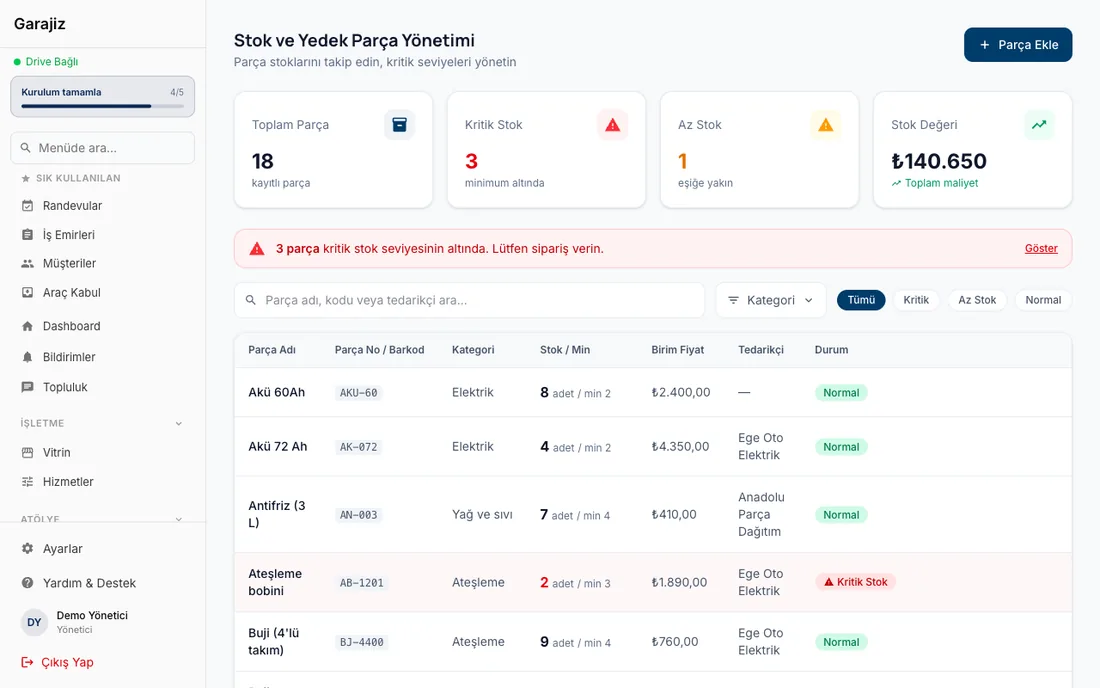
Parts added to a work order are deducted from stock, and for missing parts you get prices from several suppliers in one go. Prices line up side by side, you add your margin and place the order.
01 Headaches you leave behind
What does it solve?
Stock and warehouse records; deducted automatically from the work order.
A part that falls below its minimum quantity is flagged as low stock.
Your margin is added to each item or to the total.
02 From the workshop
A part is found in the records, not on the shelf.
In a repair shop, stock problems usually come not from not having a part but from not knowing you have it. Ordering a new filter without knowing there's one on the shelf, forgetting a part that wasn't written on the work order, or realising it's run out only when the car is on the lift — every shop knows these losses.
In Garajiz every part is a stock item: name, part number, category, unit, quantity, minimum quantity, cost and barcode. When you add a part to a work order, the quantity is deducted from stock; stock in, stock out, count adjustments and write-offs are recorded with dates. Parts that drop below their minimum quantity move to the top of the list as low stock.
Each location's warehouse is kept separately; in multi-location shops stock is tracked per location. For card sales, the POS terminal's commission and the net amount that will reach the bank are visible in the same place. If you want to buy missing parts by collecting supplier prices, the list comes ready from the work order.
03 Step by step
How does it work?
The part is added to the work order
If it's in stock it's deducted from stock; if not, suppliers are asked.
All suppliers at once
The list goes out over WhatsApp; each supplier enters price and availability from their own link.
Compare
The cheapest for each part is marked; buy from one supplier or part by part from the cheapest.
Add your margin and order
The selling price goes on the work order and the cost is stored; an order confirmation goes to the supplier.
04 Features
What's included?
No add-on modules: everything below is in Garajiz's single plan, together with every other feature.
- Stock and multiple warehouses
- Bulk add products from Excel / CSV — template and preview; items already in stock are matched by barcode or code
- Bulk stock in and out — enter a supplier's invoice in one go, scan items in with a USB barcode scanner
- Export to Excel — download the stock list, edit it and upload it back
- Purchase orders
- Supplier directory — search by brand tags
- Collecting supplier prices — no app or sign-up required
- Cheapest mix — each part from the lowest offer
- Margin — on each item or the total, cost kept hidden
- POS terminal records — commission and net amount to the bank for card sales
- Barcode part search — scan with the camera
- Low-stock alert — parts below minimum quantity are flagged
05 Questions
Frequently asked.
How do I notice a part running low?
You set a minimum quantity for each part; when stock drops below it, the part is flagged as low stock and moves to the top of the list.
Are stock movements recorded?
Yes. Stock in, stock out, count adjustments and write-offs are recorded with dates; a part added to a work order is deducted from stock automatically.
Can I import my existing stock list from Excel?
Yes. In the web panel, go to Parts Inventory → Import and upload your .xlsx or .csv file; only the “Product name” column is required. You see a preview before anything is saved: items already in stock are matched by barcode, SKU or part number, and you choose whether to add the quantity or replace it with your count. Every change is recorded as a stock movement.
Do I have to enter the parts on a supplier's invoice one by one?
No. On the bulk stock-in screen in the web panel you enter the invoice number and add parts by scanning them with a barcode scanner or searching by name; enter quantities and purchase prices and take them all into stock at once. Bulk stock-out and waste are done from the same screen.
What do I need to collect prices from suppliers?
Details are on the parts price comparison page: the list goes out with a WhatsApp link and the supplier doesn't open an account.
Is my parts cost visible to the customer?
No. The customer sees only the selling price; the cost stays with you and is reflected in the profit report.
I have more than one warehouse — can I use it?
Yes. Each location's warehouse is kept separately; stock items are tracked by warehouse and location.
06 Related pages
All in the same software.
● Start today
Try it free for 14 days.
No card. Every feature unlocked. No setup.