 garajiz
● Maintenance plans
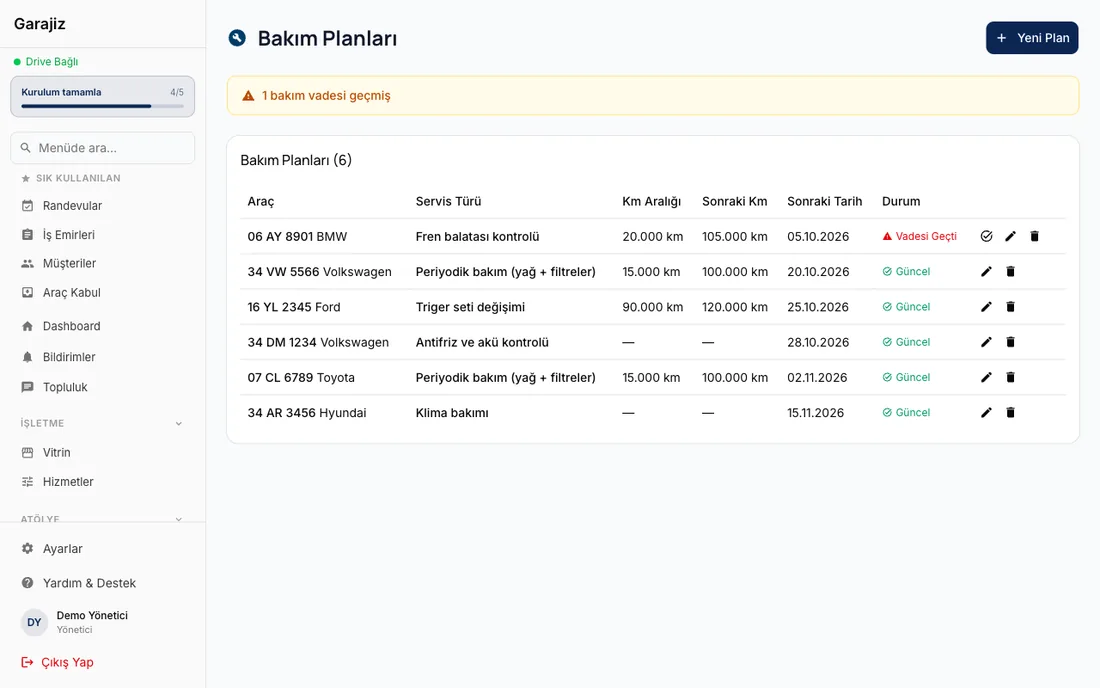
Vehicle maintenance tracking: no car due for service is forgotten.
Oil, filters, timing belt, brake fluid… Every car's maintenance depends either on mileage or on the calendar. In Garajiz you set up a maintenance plan for each car; overdue plans are flagged, and a message list is prepared for customers whose service is coming up.
01 Headaches you leave behind
What does it solve?
The next service mileage and date sit on the vehicle record.
Overdue plans are marked “overdue” in the list.
A WhatsApp list of customers whose service is due within 30 days.
02 From the workshop
Maintenance is a shop's steady source of income.
A breakdown repair is work you can't predict; scheduled maintenance can go on the calendar. A customer who gets their oil changed with you comes back to you if they're reminded when it's due. If not, they stop at the first shop on their way and the car's history gets scattered.
In Garajiz a maintenance plan is tied to a car: service type (e.g. oil and filter service), mileage interval, month interval, mileage when last done, next mileage and notes. You can set several plans on one car; timing belt and oil service are tracked separately. When the service is done you mark the plan “completed” and update the next mileage.
In the maintenance plans list each plan's status shows as “up to date” or “overdue”, and the home screen shows the number of overdue plans. The “inspection or service coming up” filter on the bulk message screen gathers owners of cars due for service or inspection in the next 30 days into one list.
03 Step by step
How does it work?
Set up the plan
Choose the car; enter the service type, mileage interval and month interval.
Enter the last service
The mileage when last done and the next mileage go on the plan.
Watch the due dates
Overdue plans are counted on the home screen and flagged in the maintenance plans list.
Call the customer in
A WhatsApp list is prepared for customers whose service is coming up; when the car arrives a work order is opened and the plan is marked completed.
04 Features
What's included?
No add-on modules: everything below is in Garajiz's single plan, together with every other feature.
- Maintenance plans by mileage and months
- Several plans per car — oil, timing belt, brake fluid separately
- Up to date / overdue status
- Overdue count on the home screen
- Coming up within 30 days — bulk message filter
- Inspection date — on the vehicle record
- Vehicle health card — green-amber-red for brakes, tyres, battery, oil, cooling, suspension and leaks
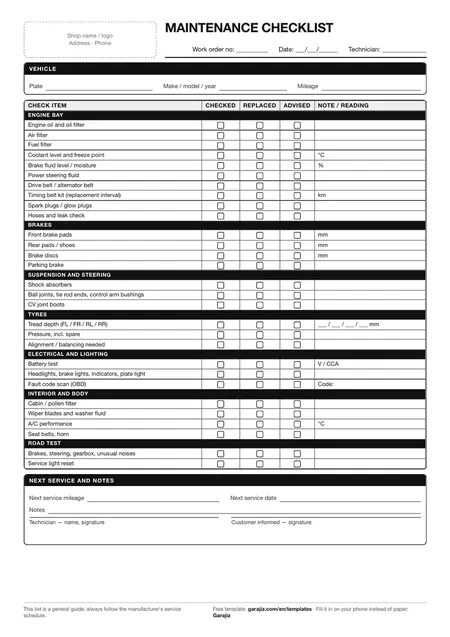
- Free maintenance checklist — printable PDF
Coming in the next versionInspection, insurance and driving licence reminders go to the vehicle owner today. The Vehicle File, which also keeps comprehensive insurance, emissions test and road tax dates on one screen, is coming in the next release.
● Free template
Scheduled maintenance checklist (PDF)
29 items in 7 groups: a printable checklist for oil, filters, brakes, tyres, battery and fluid checks. For anyone who wants to work tidily on paper before switching to software.
05 Questions
Frequently asked.
Is the service reminder sent to the customer automatically?
No, the shop doesn't send automatic messages to customers. Garajiz lists customers whose service is coming up and prepares the message text; you send it over WhatsApp.
Can I set maintenance by both mileage and time?
Yes. Mileage interval and month interval are separate fields on the plan; you can enter both.
Is the next service calculated automatically when a plan is completed?
When you mark it completed, the last service date is recorded; you update the next mileage based on the car's mileage that day.
Which items should I check during a service?
You can download and print the free maintenance checklist (29 items); on the work order you tick the items in the inspection template.
06 Related pages
All in the same software.
● Start today
Try it free for 14 days.
No card. Every feature unlocked. No setup.