 garajiz
● Collecting supplier quotes
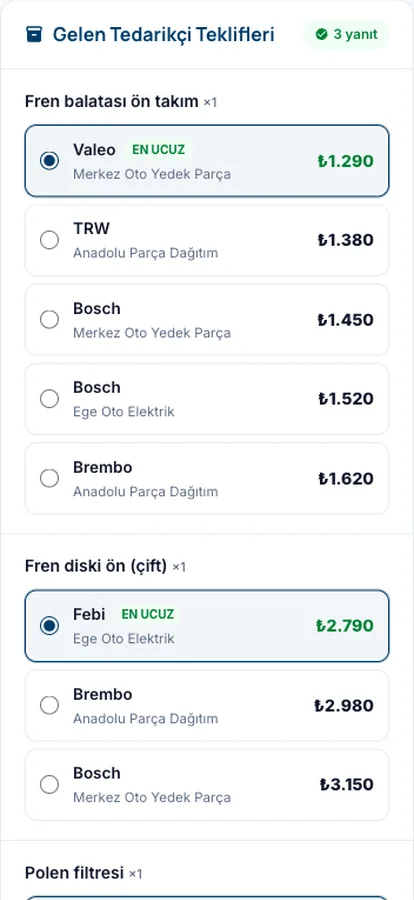
Parts price comparison: five suppliers, one table.
One job needs four parts; asking three suppliers for each means twelve phone calls. Garajiz sends the parts list to each supplier with its own WhatsApp link. Suppliers enter their price and stock, and you see them all side by side in one table.
01 Headaches you leave behind
What does it solve?
One list, a separate link for each supplier, answers in one table.
Each supplier sees only their own link; they can't see the others' prices.
Your margin is added to each item or to the total; the cost stays hidden.
02 From the workshop
Asking for prices is the most time-consuming part of the job.
Reading a list to one parts supplier, reading the same list again to another, noting the prices on paper and then working out which is cheapest… This takes hours every day and leaves a lot of room for error. A price given on the phone is forgotten as soon as the call ends.
In Garajiz the parts items on the work order are sent to the suppliers you choose. The supplier doesn't need to open a Garajiz account; they tap the link and type each item's price and whether it's in stock. As answers come in, the comparison table fills up and the lowest price for each part is marked.
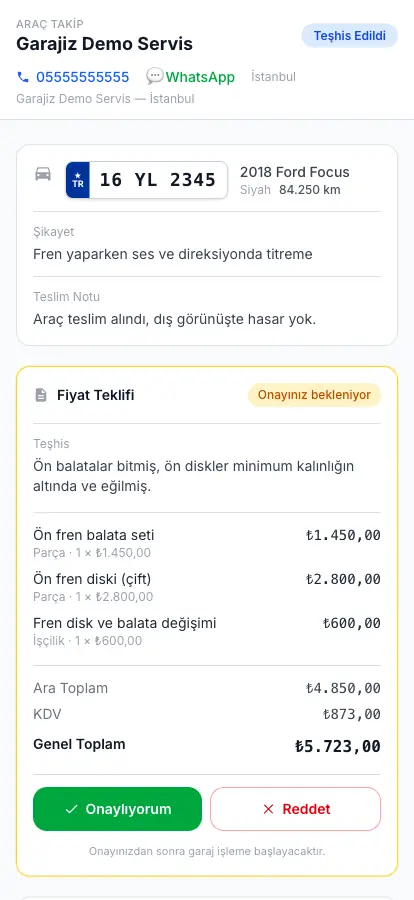
The choice is yours: buy all the parts from one supplier, or build a mixed basket by picking whichever supplier is cheapest for each part. Add your margin and the selling price goes on the work order while the cost is stored. When you place the order, a confirmation goes to the supplier and the amount owed to the supplier is recorded on the finance screen automatically, with the total cost of the parts. In the web panel you also choose the payment terms on the order (cash, 15, 30, 45 or 60 days); this option is coming to the iPhone app in the next release.
03 Step by step
How does it work?
Choose the parts
Pick the parts items on the work order; add quantities and notes.
Choose the suppliers
Search the supplier directory by brand tags and select; a separate link goes to each over WhatsApp.
Prices come in
The supplier enters price and availability from the link; the cheapest for each part is marked in the table.
Place the order
Your margin is added and the selling price goes on the work order; an order confirmation goes to the chosen supplier, and the amount owed is recorded with the total cost and the payment terms you chose in the web panel.
04 Features
What's included?
No add-on modules: everything below is in Garajiz's single plan, together with every other feature.
- Request prices with a WhatsApp link — the supplier doesn't open an account
- A separate link for each supplier — nobody sees anyone else's prices
- Side-by-side comparison — cheapest marked part by part
- Mixed cheapest basket
- Margin — on each item or the total
- Hidden cost — the customer sees only the selling price
- Order confirmation and automatic supplier payable — with payment terms in the web panel; on iPhone in the next release
- Supplier directory — search by brand tags
● Free template
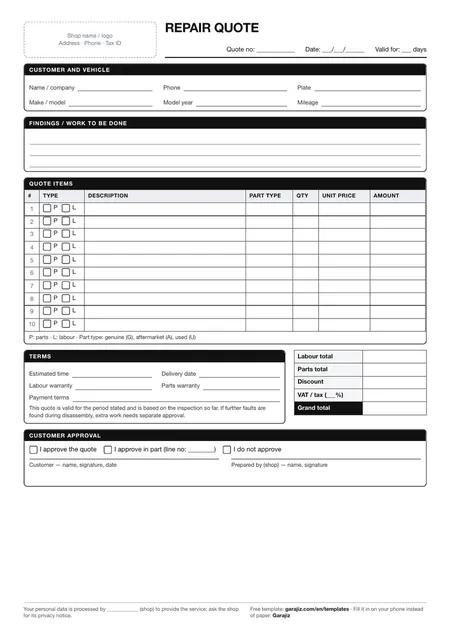
Repair quote form (PDF)
A printable quote form with fields for parts and labour items, VAT and grand total. For anyone who wants to work tidily on paper before switching to software.
05 Questions
Frequently asked.
Does the supplier need to be a Garajiz member?
No. The supplier opens the link from WhatsApp, types their prices and sends them. No account or app needed.
Can suppliers see each other's prices?
No. A separate link goes to each supplier and each sees only their own prices.
Does Garajiz find suppliers for me?
No. Garajiz isn't a parts marketplace; you add the suppliers you work with to your directory and collect prices from them.
Can I buy parts from different suppliers?
Yes. You can pick the cheapest offer for each part and build a mixed basket, or buy everything from one supplier.
Can I upload my parts list from Excel and send it to suppliers?
Yes. In the web panel, open Quick Quote and click “Upload from Excel” to load a list with part name, brand, part number and quantity; the price column can stay empty, and so can the plate. When you save the list, click “Send to Supplier” on the screen that opens: each supplier gets a WhatsApp link, and you compare the prices side by side.
Does the customer see my parts cost?
No. The cost stays with you and is reflected in your profit reports; the customer sees only the selling price on the quote.
06 Related pages
All in the same software.
● Start today
Try it free for 14 days.
No card. Every feature unlocked. No setup.