 garajiz
● Vehicle check-in and delivery
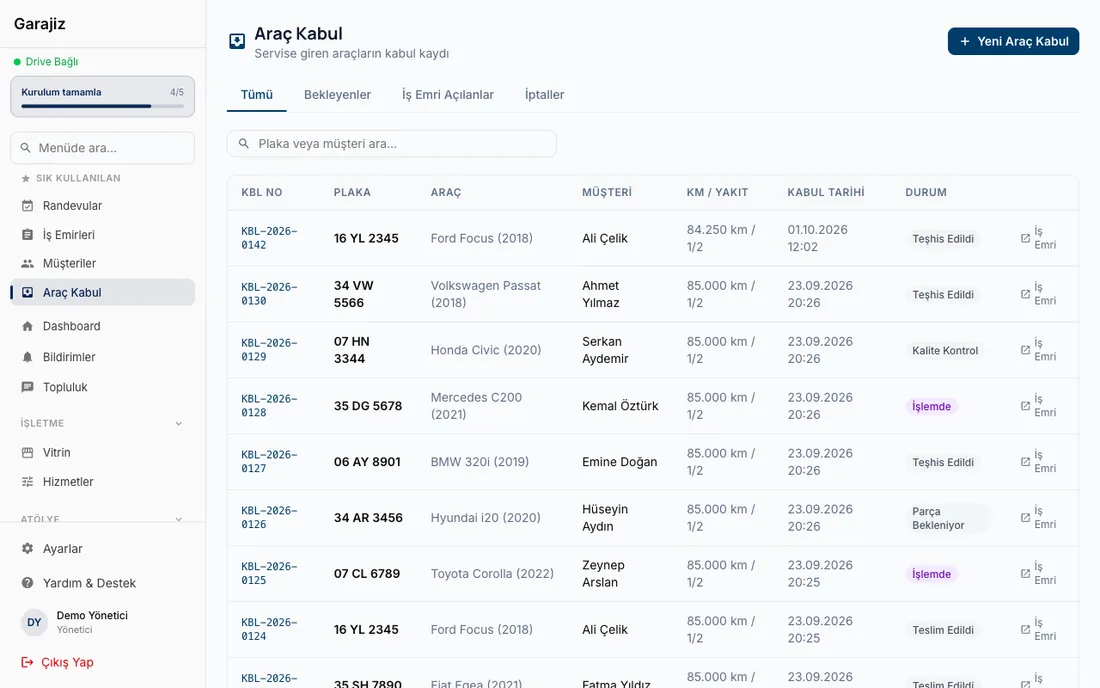
Vehicle check-in software: check-in with photos, mileage and an items list.
Your phone instead of a paper check-in form: mileage, fuel level, photos of existing damage and items left with the car are saved to the work order in a minute. The condition the car arrived in stays on record with the date and time; mileage is recorded at delivery.
Coming in the next versionRepeating the same record at delivery (photos, fuel, items), customer delivery sign-off and a check-in ↔ delivery comparison.
01 Headaches you leave behind
What does it solve?
The check-in photo is on record with the date and time.
Fuel level is marked at check-in; marking it again at delivery is coming in the next release.
Items left with the car are listed on the work order; what was left is on record.
02 From the workshop
The check-in record is the first five minutes of the job.
When a car comes through the door, nobody wants to fill in a long form; the customer is in a hurry and the technician wants to start. That's why the paper check-in form is often left half done, photos get lost on the technician's personal phone, and later nobody remembers what condition the car arrived in.
In Garajiz, check-in is the first step of the work order: mileage is typed, fuel level is marked with one of five options, and front, rear, sides and dashboard photos go from the camera straight onto the work order. Existing damage is noted; items left such as keys, registration papers, spare wheel and jack are ticked with one tap. If you like, you start the diagnosis on the same screen.
Photos are uploaded to your shop's own Google Drive account and stay attached to the work order. When the car is delivered, the delivery mileage is recorded. Repeating the same record at delivery, the customer's delivery sign-off and the check-in ↔ delivery comparison are coming with the next version of the app.
03 Step by step
How does it work?
Mileage and fuel
Mileage is typed, and fuel is chosen with one tap: Empty · ¼ · ½ · ¾ · Full.
Photos
Front, rear, sides and dashboard go from the camera straight onto the work order.
Damage notes and items
Existing damage is written down; keys, registration papers, spare wheel and jack are ticked.
Delivery
Delivery mileage is recorded. Repeating the same record at delivery and customer sign-off are coming in the next release.
▶ See it on video
Handwriting gets lost, Garajiz doesn't: digital work orders
Notebooks get lost, handwriting can't be read and never becomes a report. With digital work orders the record stays.
04 Features
What's included?
No add-on modules: everything below is in Garajiz's single plan, together with every other feature.
- Photo damage record — from the camera or gallery
- Mileage and fuel — at check-in; delivery mileage is on record too
- Items left with the car — keys, registration papers, spare wheel, jack, spare key
- Check-in ↔ delivery comparison — mileage difference, fuel, items Coming in the next version
- Customer delivery sign-off — at the counter or from the tracking link Coming in the next version
- Vehicle details from the VIN — make and model year filled in automatically (web)
- Inspection templates — a standard checklist
- Diagnosis on the same screen — fault description and fault code during check-in
Coming in the next versionRepeating the record at delivery, customer delivery sign-off and the check-in ↔ delivery comparison are coming with the next version of the app.
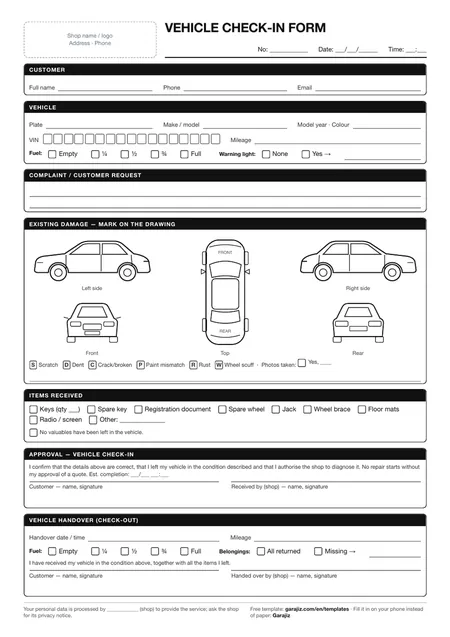
● Free template
Vehicle check-in form (PDF)
A printable A4 form for mileage, fuel level, a damage diagram and items left with the car. For anyone who wants to work tidily on paper before switching to software.
05 Questions
Frequently asked.
Does it replace the vehicle check-in form?
Yes. The mileage, fuel, damage and items left that went on the paper form are recorded on the phone; photos are attached to the work order too.
Where are the photos stored?
They're uploaded to your shop's own Google Drive account and attached to the work order.
Does the customer see the check-in photos?
Check-in photos are stored on the work order today. A check-in ↔ handover comparison on the tracking page is coming in the next release.
Can I check a car in without internet?
An internet connection is needed to save the record and upload photos.
06 Related pages
All in the same software.
● Start today
Try it free for 14 days.
No card. Every feature unlocked. No setup.