 garajiz
● Comparison
Auto repair software comparison: decide with 12 questions.
Every product calls itself “the best”. To decide, you don't need marketing lines; you need the same 12 questions asked of every product. This page isn't a ranking; it's the list of questions and Garajiz's answers to them.
Short answer
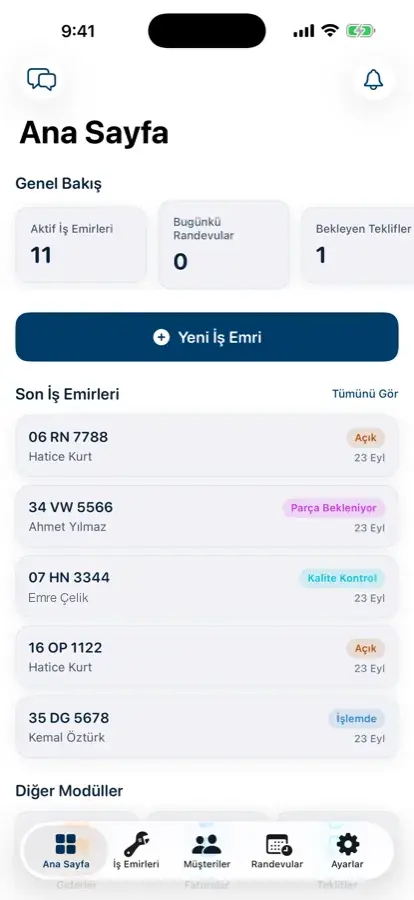
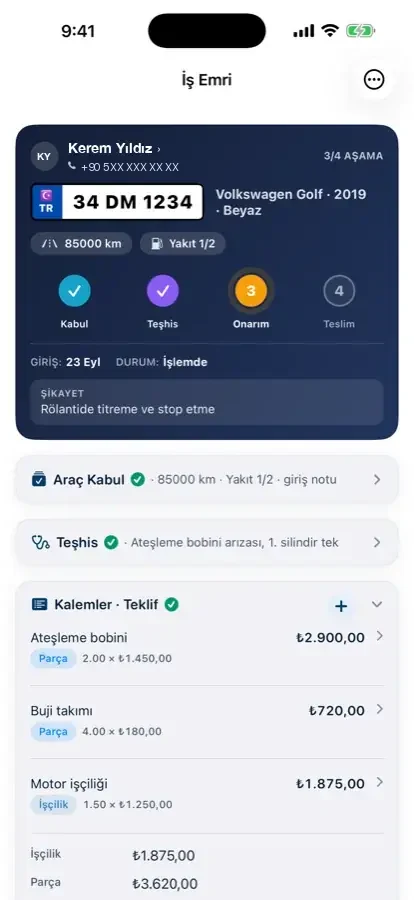
When choosing auto repair shop software, look at 12 questions: cloud or desktop, setup and updates, per-user fees, vehicle and work order limits, tax and extra location pricing, data export, invoicing, a customer tracking link and digital approval, roles and permissions, support channel, contract and cancellation terms, and a service page on Google with online booking. Garajiz has unlimited users and a vehicle passport; the shop storefront included in the subscription gives each of your services a page that can be found on Google, plus online booking, so the software doesn't just run the work, it brings in new customers too. It doesn't issue official tax invoices. Garajiz doesn't diagnose faults with AI; the iPhone app has an AI draft for explaining the diagnosis.
01 Common traps
Where comparisons go wrong.
Ask every product the same 12 questions and get the answers in writing.
Read monthly subscriptions, lifetime licenses and free plans separately.
Ask about data export and contract length up front.
02 Pricing models
Why do prices differ so much?
Products that promise the same job vary widely in price because their pricing models differ. With a monthly subscription you're also buying support and updates; with a lifetime license the software is paid for once and support and updates are often extra or limited. Free plans often limit users, vehicles or work orders; as the shop grows you may need to upgrade.
The monthly fee isn't the only number to compare: how many users are included, how many locations, are there vehicle and work order limits, does the price include tax, which channel and hours does support cover, is there invoicing, can I export my data, how long does the contract tie me in? The answers decide the total cost.
Garajiz is a premium product: one plan, with unlimited users, the shop storefront page and the vehicle passport included. The first location is $99 a month and each extra location is $59 a month. On the other hand, Garajiz doesn't issue official tax invoices; you keep using your current invoicing tool.
03 Step by step
How does it work?
Make a shortlist
Pick 3–4 products that fit your type of shop; contact them all on the same day.
Ask the 12 questions
Ask for the answers in writing; “we have that” isn't enough, ask to see it on screen.
Try it with a real job
Check the same car in on each product, send a quote and record the payment.
Work out the total cost
Monthly fee + extra users/locations + tax + time to switch.
04 Criteria
12 questions
Ask every product the questions below in the same way. Drop any product that can't show the answer on screen or put it in writing.
- Cloud or desktop? — any device or location limits? Garajiz: cloud; no device limit
- Who handles setup and updates? — Garajiz: no setup, updates are automatic and free
- Is there an extra fee per user? — Garajiz: no, users are unlimited
- Are there vehicle or work order limits? — Garajiz: no
- Does the price include tax? What does an extra location cost? — Garajiz: $99 a month for the first location, $59 a month for each extra location
- Can I export my data? — Garajiz: customer, vehicle and parts lists as CSV
- Does it issue official tax invoices? — Garajiz doesn't; it creates proforma invoices
- Is there a customer tracking link and digital approval? — Garajiz: both
- Are there roles and permissions? — can technicians see prices? Garajiz: roles; technicians don't see prices or finances
- What are the support channels and hours? — Garajiz: email (destek@garajiz.com)
- How long is the contract, and how do you cancel? — Garajiz: no commitment on the monthly plan
- Do you get a service page on Google and online booking? — Garajiz: shop storefront and online booking included in the subscription
This page isn't a ranking claim; it lists comparison criteria. Garajiz prices are as of November 2026. Check other products' prices and scope on their official pages.
05 New customers
Your software should get you found on Google too.
Most comparisons only ask about internal work: work orders, inventory, payments. But a shop grows when a driver nearby searching for “brake pad replacement”, “oil change” or “body and paint” finds you. So the 13th question should be: Will this software bring me new customers?
The shop storefront is included in your Garajiz subscription: each of your services gets its own page that Google can read, with photos, opening hours, a map and verified reviews in one place. Customers see your open slots on that page and book online; the request waits for your approval and becomes a work order once you approve it. No separate website fee, no separate booking tool.
The storefront is also live during the 14-day free trial; your page goes live from the first day. For the page to stand out in search engines, your phone number, address, at least one service and photos need to be filled in.
● Google storefront
Software isn't a cost,
it's a channel that brings customers.
Every Garajiz shop gets its own page with its services and photos that can be found on Google. A page where a driver searching for “gearbox repair in Kadıköy” can find you and book; rankings are not guaranteed.
- A page per service — each one a separate search result
- Photo gallery, opening hours, map, reviews
- One-tap booking, calling and messaging
- No need to build a website or pay an agency


Page speed and quality Google Lighthouse · desktop · 21 Oct 2026
The preview belongs to a live Garajiz shop (Yascar Servis); it pauses on hover. The scores are measurements of that page.
06 Questions
Frequently asked.
Can auto repair software bring in new customers?
Most software only runs internal work. Garajiz's shop storefront, included in the subscription, gives each of your services a page that can be found on Google, plus online booking; customers book from that page and the request waits for your approval.
What is the best auto repair shop software?
There's no single “best”; it depends on your type of shop, number of locations, number of users and which modules you need. Asking every product the same 12 questions and trying each one with a real job is the most reliable method.
What's included in Garajiz's price?
Every feature in one plan: unlimited users, the shop storefront page, online booking and the vehicle passport. The first location is $99 a month and each extra location is $59 a month. On the other hand, Garajiz doesn't issue official tax invoices; you keep using your current invoicing tool. Garajiz doesn't diagnose faults with AI; the iPhone app has an AI draft for explaining the diagnosis.
Is there a free option?
Permanent free plans exist; they usually come with limits on users, vehicles or work orders. Garajiz has no permanent free plan; you get 14 days of full access.
Lifetime license or subscription?
Garajiz is a subscription: monthly or yearly. When comparing, check whether a lifetime license charges separately for support and updates.
Can I bring my data with me when I switch?
Your parts list is imported via CSV; there's no bulk import for customers and vehicles, they're created with the first work order. You can keep the list you export from your current software in Excel.
07 Related pages
All in the same software.
● Start today
Try it free for 14 days.
No card. Every feature unlocked. No setup.